Showing posts with label Security. Show all posts

Thursday, May 16, 2013

Folder Protect 1.9.5 Full Version

1

ဖိုင္ေတြ ၊ဖို ဒါေတြကို အသံုးျပဳလို ့မရေအာင္ (read လုပ္လို ့မရေအာင္)  ၊ write လုပ္လို ့မရေအာင္(read only) ၊ မျမင္ရေအာင္ ၊ ဖ်က္လို ့မရေအာင္ ျပဳလုပ္ေပးႏုိ္္င္ပါတယ္။ဒါ့အျပင္ drive တစ္ခု လံုးကို read လုပ္လုိ ့မရေအာင္ျပဳလုပ္ေပးႏုိ္င္သလို programs ေတြကိုလည္း အသံုးျပဳလို ့မရေအာင္ျပဳလုပ္ေပးႏုိ္င္တဲ့ အစြမ္းထက္တဲ့ ေဆာ့၀ဲတစ္ခု ပါ။

ေဆာ့၀ဲကို အင္စေတာလုပ္ျပီး full version ျဖစ္ေအာင္လုပ္ျပီးရင္ password တစ္ခု ေပးရမွာပါ။ျပီးရင္ ေအာက္ကပံုမွာလို ေတြ ့ျမင္ရမွာပါ။ဖိုင္ေတြကို protect လုပ္ခ်င္ရင္ Files ဆို တဲ့ tab ကို ေရြးထားျပီး  No Access, No Visible , No Delete , No Write စသျဖင့္သင္ႏွစ္သက္ရာ Protection Method ကို ေရြးခ်ယ္ႏုိင္ပါတယ္။ဖုိင္ေတြကို ေရြး ျပီးရင္ Add ကို ႏွိပ္ျပီး protect ကို ႏွိပ္ရင္ အဲဒီဖိုင္ေတြကို protect လုပ္ျပီးပါျပီ။

2

Protect လုပ္ထားတဲ့ ဖိုင္ေတြ ဖိုဒါေတြကို ေတြကို ေအာက္ကပံုမွာလို ေတြ ့ျမင္ႏိုင္ပါတယ္။အခ်ိန္မေရြး ျပန္ျပီး Unprotect လုပ္ႏုိင္ပါတယ္။

3

Folder, drive , programs ေတြကို protect လုပ္ဖို ့အေပၚကနည္းအတိုင္းျပဳလုပ္ႏို္င္ပါတယ္။အသံုးျပဳနည္းေတြ ကို မရွင္းလို ့ေသခ်ာေလ့လာခ်င္ရင္ official site မွာ ေလ့လာပါ။ Setting ထဲမွာေတာ့ stealth mode ကို အသံုးျပဳလို ့ရမယ့္ option ကို ေရြးခ်ယ္ႏို္င္ပါတယ္။Stealth mode ကို အသံုးျပဳရင္ေတာ့ safe mode နဲ ့ ၀င္းဒိုး တက္တဲ့ အခ်ိန္မွာေတာင္ သင္ protect လုပ္ထားတဲ့ ဖုိင္ေတြ ၊ဖိုဒါေတြ ၊ drive ၊ programs ေတြကို ကာကြယ္ေပးႏို္င္ပါတယ္။ေနာက္ျပီး stealth mode က  folder protect program ကို တစ္ျခားသူေတြ အသံုးျပဳလို ့မရေအာင္ ကာကြယ္ေပးထားမွာပါ။Folder protect program ကို သံုးဖို ့ stealth mode မွာ combination key ေတြကို သတ္မွတ္ ေပးရမွာပါ။

4

download button

Download Folder Protect (3.6) mb  from Dropbox  (or)  Mirrorcreator

Sunday, April 7, 2013

Softperfect Wi-Fi Guard : Protect Your Wireless Network From Intruders

1

မိမိရဲ  ့ Wireless Network ကို ခိုးသံုးေနသူမ်ား ရန္မွကာကြယ္ဖို ့ Softperfect Wi-Fi Guard ဆို တဲ့ freeware ကို သံုးပါ။Windows ,Mac, Linux စတဲ့ os ေတြ မွာသံုးႏုိင္ပါတယ္။Windows အသံုးျပဴသူေတြ အတြက္ portable version လည္းရွိပါတယ္။သင့္ wireless network မွာ ခ်ိတ္ဆက္ေနတဲ့ devices ေတြကို scan လုပ္ေပးႏို္င္ပါတယ္။ Manual Scan လုပ္ႏိုင္သလို အခ်ိန္အတုိင္းအတာတစ္ခု သတ္မွတ္ ျပီး အဲဒီ အခ်ိန္ေရာက္ရင္ အလို လို  scan လုပ္ေပးႏိုင္ပါတယ္။Device တစ္ခု သင့္ network ကို လာခ်ိတ္ဆက္ရင္ အသံေပးျပီး alert လုပ္ႏိုင္ပါတယ္။

ashampoo 03

Download Softperfect Wi-Fi Guard @ http://www.softperfect.com/products/wifiguard/

Wednesday, March 27, 2013

Elcomsoft Wireless Security Auditor Pro 5.1.271 Full Version

1

Wireless Network ေတြ ရဲ  ့ password ေတြကို ရွာေဖြ ေဖာ္ထုတ္ေပးနိုင္ပါတယ္။တစ္နည္းအားျဖင့္ သင့္ network ရဲ  ့ password ကို လည္း ဘယ္ေလာက္ လံုျခံဳ လဲဆို တာ စမ္းသပ္ႏိုင္ပါတယ္။Brute-force attack,dictionary attack,word attack,mask attack,combination attack,hybrid attack စတဲ့ နည္း ေတြ စံုလင္စြာ ပါရွိပါတယ္။http://www.elcomsoft.com/ewsa.html မွာ အေသးစိတ္ေလ့လာႏိုင္ပါတယ္။

Features and Benefits

  • Determine how secure your wireless network is
  • Built-in wireless network sniffer (with AirPCap adapters)
  • Test the strength of WPA/WPA2-PSK passwords protecting your wireless network
  • Save time with patent-pending GPU acceleration technology when one or more compatible NVIDIA or ATI video cards are present
  • Hardware acceleration on Tableau TACC1441 hardware
  • Run advanced dictionary attacks with highly configurable variations
  • Perform attacks from inside or outside of your network

Download Elcomsoft Wireless Security Auditor With Crack (18.3)mb from Dropbox  (or) Mirrorcreator

Saturday, March 23, 2013

Deep Freeze Enterprise 7.51.220.4170 With Keygen

1

အင္တာနက္ ဆိုင္ေတြ မွာ အသံုးမ်ားတဲ့ security ေဆာ့၀ဲတစ္ခု ပါ။အင္တာနက္ဆိုင္ေတြ မွာ user ေတြ ေဒါင္းလုပ္လုပ္ထားတဲ့  ဖုိင္ေတြ ၊ အင္စေတာလုပ္တဲ့ ေဆာ့၀ဲေတြ ၊ system setting ေတြ ျပင္ထားတာေတြကို လိုက္ရွင္းရရင္ မလြယ္ပါဘူး။Deep Freeze က အဲဒီ ျပႆာနာကို ေျဖရွင္းေပးႏိုင္ပါတယ္။သင့္ကြန္ျပဴတာရဲ  ့ image ကို  Deep Freeze ကကာကြယ္ေပးႏိုင္ပါတယ္။Deep Freeze ကို သံုးထားရင္ User ေတြ သင့္ကြန္ျပဴတာကို ဘာေတြပဲ လုပ္ထားလုပ္ထား  restart ခ်လို္က္တာနဲ ့ နဂို အေနအထား တစ္နည္းအားျဖင့္ သင့္ကြန္ျပဴတာရဲ  ့ image ကို ျပန္ရရွိေစႏိုင္ပါတယ္။အဲေလာက္အစြမ္းထက္လို ့လည္း အင္တာနက္ ဆိုင္ေတြ မွာ အသံုးျပဳေနၾကတာပါ။သင့္ personal computer မွာ ေရာ ဒီလို ကာကြယ္ထားႏုိင္ပါတယ္။ ကြန္ျပဴတာတိုင္းမွာ ေဆာင္ထားသင့္တဲ ့ေဆာ့၀ဲ ေကာင္းတစ္ခု ပါ။

Customized configuration makes setting up Faronics Deep Freeze for your unique environment a breeze. Using the Deep Freeze Configuration Administrator, you can specify multiple passwords, select drives to be Frozen, create ThawSpaces to save data, create workstation tasks, schedule maintenance and set advanced networks. You can also create multiple customized installers with different configurations.

Easy deployment is made possible with several options. In addition to deploying Deep Freeze as part of your imaging solution, you can deploy Deep Freeze as a Silent Install natively either as an .exe or as a .msi by using our Deep Freeze MSI Packager.  And you can also use the Deep Freeze Console to deploy.

Central management makes it easy to deploy, configure, and manage Deep Freeze. All you need to do is use the robust Enterprise Console or Core Console included free of charge. Or use the comprehensive built-in Command Line Interface to manage Deep Freeze from within the most popular desktop management systems such as Microsoft SCCM, Dell KACE, Spiceworks, and Symantec Altiris. Check out our Integration Page.

Enhanced security is rolled into Faronics Deep Freeze with protection for the master boot record (MBR) from rootkit injections, making your security bulletproof. The Customization Code ensures that unauthorized ad­ministrators are prevented from accessing or controlling a computer that runs Deep Freeze. Administrators can also assign up to 15 passwords or create One-Time passwords that will expire after a single use on the workstation.

Windows updates are even easier to automate with Deep Freeze. Now you can automatically download windows updates even when machines are Frozen. Cached updates are applied as soon as the machines are Thawed, which means Windows Updates are much faster. Forget about setting maintenance window completion times, since Deep Freeze just got even smarter! It can now detect when updates are complete and automatically returns the computer back to a Frozen state.

Retain data across reboots by redirecting both user and application data to storage space on non-system or network drives. Or create virtual storage drives called ThawSpaces – it’s entirely up to you. Data retained in a ThawSpace or a Thawed drive is not erased upon reboot even when the computer is in a Frozen state. Or try using the complementary Faronics Data Igloo that allows you to redirect data for storage.

Download Deep Freeze Enterprise 7.51.220.4170 With Keygen (16) mb  from Dropbox  (or)  Mirrorcreator

Deep Freeze Administrator Installation

Deep Freeze ကို အင္စေတာလုပ္ ဖို ့ရိုးရိုး ေဆာ့၀ဲေတြကို အင္စေတာလုပ္သလို လုပ္ႏိုင္ပါတယ္။ျပီးရင္ Customization Code ျဖည့္ေပးပါ။

ashampoo 01

ေနာက္အဆင့္မွာ Customization Code ကို ေသခ်ာသိမ္းထားဖို ့ေျပာပါလိမ့္မယ္။

ashampoo 02

Workstation Creation

Start Menu>All Programs ေအာက္က ေန Deep Freeze Administrator ကို run ပါ။

ashampoo 03

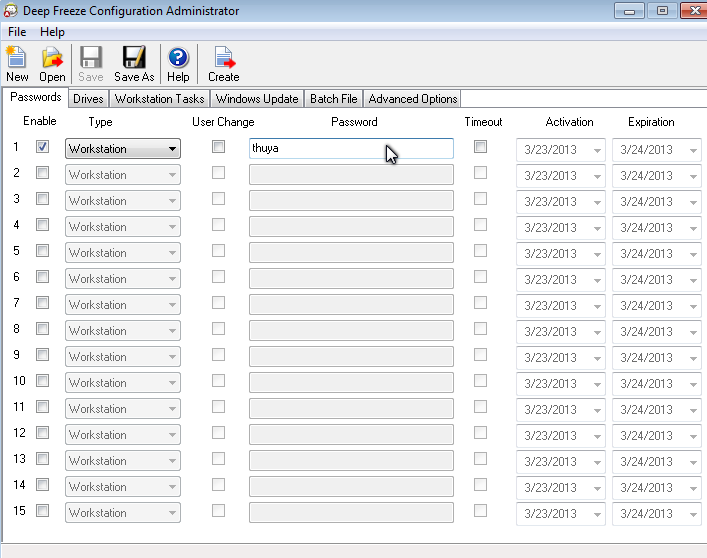
Workstation ေဘးက check box မွာ အမွန္ျခစ္ေပးျပီး Password ေနရာမွာ password သတ္မွတ္ေပးပါ။
ashampoo 04

Drives ကို ႏွိပ္ျပီး သင္ ကာကြယ္ခ်င္တဲ့ drive ေတြကို ေရြးေပးပါ။

ashampoo 05

Create>Create Workstation Install Program ကို ႏွိပ္ပါ။ဒါဆိုရင္ workstation install program တစ္ခု ကို ျပဳလုပ္ျပီး သိမ့္မယ့္ေနရာကို ေရြးေပးပါ။Default အားျဖင့္ေတာ့ Deep Freeze ရဲ  ့ installation folder ေအာက္က Install Programs ဖိုဒါေအာက္မွာသိမ္းေပးမွာပါ။

ashampoo 06

ျပီးရင္ installation file ျပဳလုပ္ျပီးေၾကာင္း ၀င္းဒိုးေပၚလာပါလိမ့္မယ္။

ashampoo 07

Workstation Installation

သင့္ကြန္ျပဴတာရဲ  ့ image ကို  ကာကြယ္ခ်င္တဲ့ အခ်ိန္ေရာက္ရင္ Installation file သိမ္းထားတဲ့ ေနရာကို သြားျပီး  exe ဖိုင္ကို run ျပီး  အင္စေတာလုပ္ ပါ။Default အားျဖင့္သိမ္းထားတဲ့ ေနရာက  C:\Program Files (x86) (or) Program Files \Faronics\Deep Freeze 7 Enterprise\Install Programs ေအာက္မွာသိမ္းထားမွာပါ။

ashampoo 08

Installation wizard အတိုင္းအင္စေတာလုပ္ေပးပါ။

ashampoo 09

အင္စေတာလုပ္ျပီးရင္ ကြန္ျပဴတာက အလို လို restart က်သြားျပီး ျပန္တက္လာရင္ system tray မွာ ၀က္၀ံ ပံုေလးကို ေတြ ့ျမင္ႏိုင္ပါတယ္။ဒါဆိုရင္ Deep Freeze က သင့္ကြန္ျပဴတာကို ကာကြယ္ေပးေနပါျပီ။အဲဒီအတြက္ သင့္ကြန္ျပဴတာမွာ တစ္ျခားတစ္ေယာက္ ျဖစ္ေစ သင္ကိုယ္တိုင္ျဖစ္ေစ system setting ေတြ ကို ျပင္ထားတာေတြ ၊ေဆာ့၀ဲအင္စေတာလုပ္တာေတြ ၊ေဆာ့၀ဲျဖဳတ္တာေတြ၊ဖိုင္ေတြဖ်က္ပစ္တာေတြ  ကို ဘယ္လို ပဲလုပ္လုပ္ ခြင့္ျပဳေပးေနမွာ ျဖစ္ေပမယ္ ့ restart ခ်လိုက္တာနဲ ့သင့္ကြန္ျပဴတာရဲ  ့နဂိုမူလ အေျခအေန တစ္နည္းအားျဖင့္  နဂို မူလ image ကို ျပန္ရရွိေစမွာပါ။နဂိုမူလ အေျခအေနဆိုတာက Workstation Installation ျပဳလုပ္လိုက္တဲ့ အခ်ိန္က သင့္ကြန္ျပဴတာရဲ  ့ အေျခအေနကို ဆိုလို တာပါ။

ashampoo 10

Deep Freeze အား Disable ျပဳလုပ္ျခင္း

သင့္ကြန္ျပဴတာကို သင္ျပန္အသံုးျပဳေတာ့မယ္ဆိုရင္ Deep Freeze ကို disable ျပဳလုပ္ရမွာပါ။အဲဒီအတြက္ system tray က ၀က္၀ံပံုကို double click ႏွိပ္ပါ။ဒါမွမဟုတ္ shortcut key (Ctrl+Shif+Alt+F6) ကိုႏွိပ္ပါ။Workstation password ျပန္ထည့္ေပးပါ။

ashampoo 11

Boot Thawed ကို ေရြးျပီး Apply and Reboot ကိုႏွိပ္ပါ။

ashampoo 12

ကြန္ျပဴတာ boot ျပန္တက္လာရင္ system tray က ၀က္၀ံ ပံုေလးက ၾကက္ေျခခတ္ နဲ ့ျဖစ္ေနပါလိမ့္မယ္။အဲဒါဆို Deep Freeze ကို disable ျပဳလုပ္ျပီးပါျပီ။သင့္ကြန္ျပဴတာကို သင့္စိတ္ၾကိဳက္ ျပန္အသံုးျပဳႏိုင္ပါျပီ။ဒီ အခ်ိန္မွာ setting ေတြ ျပင္တာေတြ ၊ဖိုင္ေတြ ဖ်က္တာေတြ ၊ေဆာ့၀ဲ အင္စေတာလုပ္တာေတြ ၊ေဆာ့၀ဲေတြ ျဖဳတ္တာေတြကို သင့္စိ္တ္ၾကိဳက္ျပဳလုပ္ႏို္င္ပါတယ္။Deep Freeze က အဲဒီအခ်ိန္မွာ သင့္ကြန္ျပဴတာရဲ ့ image ကို ကာကြယ္ထားျခင္းမရွိပါဘူး။

ashampoo 13

Deep Freeze ကို ျပန္ျပီး enable ျပဳလုပ္ခ်င္ရင္ system tray က ၀က္၀ံပံုကို double click ႏွိပ္ပါ။ဒါမွမဟုတ္ shortcut key (Ctrl+Shif+Alt+F6) ကိုႏွိပ္ပါ။Workstation password ျပန္ထည့္ေပးပါ။Boot Frozen ကို ျပန္ေရြးေပးျပီး Apply and Reboot ကို ႏွိပ္ေပးပါ။ဒါဆိုရင္ သင့္ကြန္ျပဴတာကို Deep Freeze ကျပန္ျပီးကာကြယ္ေပးေနပါျပီ။

Workstation ကို Uninstall ျပဳလုပ္ျခင္း

Workstation ကို Uninstall ျပဳလုပ္ဖုိ ့အတြက္ Deep Freeze ကို အရင္ disable ျပဳလုပ္ရမွာပါ။Disable လုပ္ျပီးရင္ Workstation Install Program ဖိုင္ရွိတဲ့  C:\Program Files (x86) (or) Program Files\Faronics\Deep Freeze 7 Enterprise\Install Programs ဖိုဒါေအာက္က exe ဖိုင္ကို run ျပီး uninstall လုပ္ပါ။Reboot အလိုလို က်ျပီးရင္ Workstation ကို uninstall ျပဳလုပ္ျပီးပါျပီ။C:\Program Files (x86) (or) Program Files \Faronics\Deep Freeze 7 Enterprise\Install Programs ဖိုဒါေအာက္မွာ ေတာ့ သင္ျပဳလုပ္ထားတဲ့ Workstation Install Progam ကေတာ့ရွိေနမွာ ျဖစ္ျပီး အခ်ိန္မေရြး Workstation ကို ျပန္ အင္စေတာလုပ္ျပီး သင့္ကြန္ျပဴတာရဲ  ့ image ကို ကာကြယ္ႏိုင္ပါတယ္။

ashampoo 15

Wednesday, October 10, 2012

Free Download XUS PC Lock 4.1.68 With Keygen

1

သင့္ကြန္ျပဴတာကို smart phone ေတြမွာလို pattern lock လုပ္ျပီး lock ခ်ထားခ်င္ရင္ေတာ့ ဒီေဆာ့၀ဲကိုသံုးပါ။Software ကို install လုပ္ျပီး register လုပ္ျပီးတာနဲ ့ pattern တစ္ခုကို အရင္ျပဳလုပ္ျပီး system tray ကေန lock လုပ္ႏိုင္ပါျပီ။Pattern lock ျဖစ္တဲ့အတြက္ keylogger ေတြရန္ကေၾကာက္စရာမလိုေတာ့ပါဘူး။Lock လုပ္ထားတဲ့အခ်ိန္မွာ internet connection ကို ပိတ္ခိုင္းထားႏိုင္ပါတယ္။Pattern lock ေတြကို သိမ္းထားႏိုင္ပါတယ္။Lock screen ရဲ့ေနာက္ခံပံုကိုုလည္းၾကိဳက္ႏွစ္သက္ရာေရြးခ်ယ္အသံုးျပဳႏိုင္ပါတယ္။

Benefits & Features


* A new & fun way for you to lock your computer.
* Support Multiple Monitors.
* Anti Key-Logger. XUS Dynamic Password Technology makes your computer more secure.
* The funniest, most customizable way to lock your computer!
* Have 3 built-in patterns: 3x3, 4x4, 5x5 you can choice.
* Locking and Unlocking animation effect.
* Be able to disconnect internet access when system is locked.
* Back up pattern feature.
* Auto-lock the computer when Windows startup or in idle mode.
* Set a timer to turn off monitor automatically.
* Show Time and Date on locked screen.
* Make your computer has Windows 8's lock feature.
* Alert if the incorrect pattern is entered a maximum times. Completely customizable.
* Custom background image, and lots of customization options for the look of the locked screen.

Download XUS PC Lock with Keygen from Dropbox  (or)  Directmirror  (1.22)  mb

Tuesday, October 9, 2012

USB Disk Manager : Protect Your USB Disk & Computer From Viruses


USB disk ေတြဟာကြန္ျပဴတာတစ္လံုးနဲ ့တစ္လံုးၾကားမွာ virus ေတြသယ္ေဆာင္ျဖန္ ့ျဖဴးေပးႏိုင္တဲ့အတြက္ USB disk ေတြအသံုးျပဳမယ္ဆိုရင္ ဒီေဆာ့၀ဲ ေလးနဲ ့ကာကြယ္ထားသင့္ပါတယ္။USB disk manager ကသင့္စက္အတြင္းကို virus ေတြမ၀င္ႏိုင္ေအာင္ကာကြယ္ေပးႏိုင္ပါတယ္။Features ေတြကိုေအာက္မွာဆက္ဖတ္ပါ။


Write Protect ကို Turn On လုပ္ေပးျခင္းျဖင့္ သင့္စက္မွဖိုင္ေတြကို usb disk ကို ကူးယူႏိုင္ျခင္းမွကာကြယ္ေပးထားပါတယ္။ဒါ့အျပင္ usb disk မွ virus ေတြကိုလည္းသင့္စက္အတြင္းမ၀င္ႏိုင္ေအာင္ကာကြယ္ေပးထားပါတယ္။

Execute Deny လုပ္ထားျခင္းျဖင့္ usb disk ကေန သင့္စက္ ထဲမွ program ေတြကို run လု္ိ ့မရေအာင္လုပ္ေပးႏိုင္ပါတယ္။

Disable USB လုပ္ထားရင္ ေတာ့ သင့္စက္နဲ ့usb disk ၾကားမွာ အဆက္အသြယ္မရွိေအာင္လုပ္ေပးႏိုင္ပါတယ္။

Setting ထဲမွလည္း windows auto run/ auto play function ကို disable လုပ္ႏိုင္ပါတယ္။

USB disk manager က freeware ပါ။Latest version ကို official site မွာ ေဒါင္းလုပ္လုပ္ပါ။
Download USB Disk Manager @  http://www.syedgakbar.com/products/usb/

Thursday, September 20, 2012

Free Download Lock And Unlock Your PC With USB Drive Software 7.0 With Crack

download

USB drive ကိုအသံုးျပဳျပီးသင့္ ကြန္ျပဴတာကို Lock/Unlock လုပ္ႏိုင္ပါတယ္။

This software offers a solution for users who want to lock their computer using a USB device as a physical key instead of a password. Each USB device has a unique identity and with this software it can be used as a key. Simply insert a flash drive into the computer then select that drive from the dropdown list, click start and remove the USB device. The computer is then locked until the same drive is inserted again. This easy to use software provides easy and sure security against others using your computer while you are away.

Download lock and unlock your pc with usb drive with crack from  Dropbox  (or)  Microcreator  (2.78)  mb

Sunday, September 16, 2012

Free Download Net Monitor For Employee Professional 4.9.1 With Keygen

images (1)

သင့္ ၀န္ထမ္းေတြ ရဲ  ့computer screen ေတြကို ၾကည့္ရွုႏိုင္ျပီး ထိန္းခ်ဳပ္ႏိုင္ပါတယ္။

ေစာင့္ၾကည့္မေနတဲ့အခ်ိန္မွာေတာင္ record လုပ္ထားႏိုင္ပါတယ္။

သင့္ screen ကို ၀န္ထမ္းေတြကိုျပျပီး ညႊန္ၾကားႏိုင္ပါတယ္။

web sites ေတြကို ပိတ္ႏိုင္ပါတယ္။

What is new in this release?

  • Block individual websites.
  • Monitors and controls  all Terminal Services sessions (thin clients, RDP, TS)
  • Record remote computers screens to AVI files.
  • Stop applications on remote computers.
What is it useful for?
  • For monitoring and recording your employees activities on a remote computers
  • For preventing internet browsing on remote computers
  • For starting and stopping applications and processes on remote computers.
  • For monitoring students in the classroom to achieve better discipline or, just to assist them when they are in trouble (by using the remote control feature).
  • For administrating all computers just from one location – your computer.
  • For presenting your screen to students.
  • For locking students computers while they are waiting for further instructions or assignments.
  • Helping your students by showing your desktop to them.
  • Turning off, restarting, .... remote computers with one click.
What are the major benefits of using Net Monitor for Employees Professional?
  • Installation and use of the application is very easy since all of the functions can be accessed with a few mouse clicks.
  • You have complete control over what remote users are doing.
  • This application provides you with a live picture of the remote computer screens. The live screen (due to some optimizations) does not use a high bandwidth, but even when the lower network bandwidth is required the refresh interval can be enlarged using one mouse click.
  • You can make the presentation by showing your live screen to students
  • Application allows you to take over the remote computer by controlling its mouse and keyboard.
  • The remote computers´ screens are represented in the table with a customizable number of rows as thumbnails.
  • Using this application, you can always see which user is actually logged on to the remote computer.
  • Schedule remote computers desktop recording to AVI files
  • Execute several actions on all remote computers with on click
  • Block network ports
  • Block or allow individual websites
  • Works in Terminal Services (RDP) environment - monitor all sessions
Main Features:
  • Displaying a live picture of a remote computer.
  • You can take control of a remote computer by controlling its mouse and keyboard.
  • More remote screens can be displayed in a table.
  • Computers can be organized in computer groups (e.g. classrooms)
  • A remote screen can be zoomed to an actual size.
  • The name of the connected user is displayed.
  • Record remote computers screens to AVI files.
  • Show your desktop to students
  • Power off, restart, hibernate, suspend remote computers
  • Log off desktop users
  • Lock workstation
  • Control screensaver
  • Block internet
  • Multi-monitor support
  • Control over running processes
  • You can lock selected remote computers
  • You can display a message on selected remote computers.
  • When lower bandwidth is required, the refresh interval can be enlarged.
  • Automatic connection to a remote computer is optional.
  • Settings for the agent are encrypted and password protected.
  • Connection to a remote computer is password protected.
  • Access to monitoring the console is password protected. If more users use the same computer, different profiles and access passwords can be set.
  • More monitoring consoles can be connected to the same remote computer - you can monitor your students from different locations.
  • Application can optionally use encrypted communication.
  • Agent can be remotely installed.
  • Fast users switching is supported.
  • Monitor and control thin clients (TS, RDP).

Download Net Monitor For Employee from   Dropbox  (or)  Directmirror  (13)  mb

Download Keygen from  Dropbox  (or)   Directmirror

Tuesday, September 11, 2012

Free Download USB Safeguard 6.0 With Keygen

images

သင့္ USB Stick ကို password နဲ ့ပိတ္ျပီး လံုျခံဳေစမွာပါ။

USB Drive တစ္ခုလံုးကို encrypt လုပ္ႏိုင္သလို သီးသန္ ့ ဖိုင္ေတြ ဖိုဒါေတြကိုလည္း encrypt လုပ္ႏိုင္ပါတယ္။

Features
  • Runs with any USB pen drive
  • No installation required
  • On the fly AES 256 bits encryption
  • Secure your data if drive is lost
  • Unecessary admin rights
  • There is no back door
  • 100% portable

    System requirements:
  • Intel Pentium III 1,0 Ghz (or equivalent processor, such as AMD) or better
  • Windows XP/Vista/7/8 (32 bit and 64 bit)
  • 128 MB of memory RAM available
  • 100 Kb of free space on your pen drive
  • Supports FAT16, FAT32 & NTFS file system
  • Not for partitioned or bootable devices
  • Compatible with external hard disk

Download USB Safeguard with keygen (1.06) mb


Saturday, September 8, 2012

Free Download IObit Protected Folder 1.1 With Serial

images (1)

သင့္ကြန္ျပဴတာကဖိုင္ေတြကို password ေပးျပီးသိမ္းထားခ်င္ရင္ေတာ့ IObit Portected Folder ကိုသံုးပါ။ဖုိင္ဆိုက္ေသးငယ္ျပီးအသံုးျပဳရတာလြယ္ကူပါတယ္။
Key Benefit

Extremely Easy to Use
Just drag and drop the file to Protected Folder with folder lock password to protect it.Its intuitive interface makes it the ideal utility for complete computer novice.
Hide from View
Lock folders from been investigated and searched for certain files on your computer. No one can see them except you.
Block Access
Easily block access to files, folders, and programs you choose. You can password protect or lock folder and its files then others can see it but cannot access, read or view its content.
Write Protection
Protect your files from being modified by others. No one can change the content of your files without your permission. Lock your file and folder to be unchangeable.
Privacy Protection
Keep your private data, files, pictures or videos into Protected Folder, the only way to access these files is with your folder password.
No more Data theft, Data loss, or Data leaks
Folder lock our important files from being accidentally deleted, replaced, or stolen by others.
Safe and Secure
Protected Folder is safe and secure, without any virus, adware, and spyware.

Download IObit Protected Folder With Serial (3.66) mb

Friday, August 10, 2012

Free Download Luxand Blink Pro 2.4 with serial


LuxandBlinkScreenshot
Face recognition system ျဖင့္သင့္မ်က္ႏွာကိုမွတ္သားထားျပီး windows log in လုပ္ႏိုင္ပါတယ္။
password အသံုးျပဳရန္မလို သျဖင့္ password မမွတ္မိျခင္း၊တစ္ျခားသူမ်ား သင့္ password ကို အလြဲသံုးစားျပဳျခင္းမွလည္းကာကြယ္ျပီးသားျဖစ္ပါတယ္။
Enable face locking feature ကေတာ့သင့္ webcam ျဖင့္ ေစာင့္ၾကည့္ေပးေနျပီး တစ္ျခားသူမ်ား သင့္ပီစီ ေရွ  ့ေရာက္လာပါက သင့္ပီစီကို lock ခ်ေပးႏိုင္ပါတယ္။

Download Luxand Blink Pro 2.4 (20.39) mb
Get Serial

Wednesday, August 8, 2012

Free Download Who Is On My Wifi 2.0.6 with keygen


box
သင့္ wifi network ကို အခ်ိန္ျပည့္ ေစာင့္ၾကည့္ေပးႏိုင္ပါတယ္။
သင့္ wifi network ကိုခိုးသံုးေနတဲ့ ကြန္ျပဴတာေတြကို ရွာေဖြေပးႏိုင္ပါတယ္။
Download Who is on my wifi with keygen (1.85) mb

Tuesday, August 7, 2012

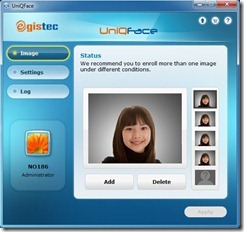
Free Download Uniq Face


EGISTEC    286713-UniQFace
Simply log in with your face.
သင့္မ်က္ႏွာကိုမွတ္ထားျပီးသင့္ မ်က္ႏွာနဲ ့ windows log in လုပ္ႏိုင္ပါတယ္။
multiple user log in feature က widows တစ္ခုတည္းမွာ ၅ ေယာက္အထိ မ်က္ႏွာ ေတြကို မွတ္ထားေပးပါတယ္။

ဒီ software က trial ပါ။ ရက္အကန္ ့အသတ္္ရွိပါတယ္။crack,keygen, patch, serial ေတြရွာမေတြ ့လုိ ့time stopper နဲ ့တြဲသံုးပါ။time stopper က trial ရက္အကန္ ့အသတ္ ကို ရပ္ထားေပးမွာျဖစ္တဲ ့အတြက္ထာ၀ရသံုးႏိုင္ပါတယ္။
Time stopper အသံုးျပဳနည္းကိုဖတ္ပါ။
Download Uniq face (68.76) mb
Download Time stopper (0.91) mb

Sunday, July 29, 2012

Free Download USB Safely Remove v 5.1.2


usb
သင့္ရဲ  ့external hard drive, memory card ,memery stick ေတြကိုWindows built-in safely removal tool  နဲ ့ျဖဳတ္မရတဲ့အေျခအေနမ်ိဳးမွာ ဒီ software ေလးကကူညီမွာပါ။ Features ေတြကိုေအာက္မွာဆက္ဖတ္ပါ။

  • Safely remove in one click!
  • Displaying processes which are preventing USB device from being stopped
  • Powerful command line support
  • 3 methods to stop devices.
  • Automatically assigning hotkeys.
  • Forbidding stopping any device.
  • Customizable names and descriptions for devices.
  • Notifications about connecting/disconnecting devices with the help of a balloon tooltip.
  • Playing sounds or running external programs when devices are connecteddisconnected.
  • Restricting access to the features of the program with a password.
  • Loading custom images for devices
  • Ability to operate SATA drives
  • Support all version Windows (32-bit or 64-bit)
Download USB safely remove with crack (7.17) mb